Automation & AI
Business process automation: 7 practical examples that can save time and money
Discover 7 practical business process automation examples that reduce manual work, improve accuracy, and help businesses save time and money.
Every business has repetitive tasks.
Customer inquiries arrive by email. Employees copy information between applications. Invoices need to be processed. Sales teams follow up with potential customers. Managers collect data from multiple systems to prepare reports.
Individually, these tasks may seem small. But repeated dozens or hundreds of times, they can consume significant time and create opportunities for mistakes.

Business process automation helps companies reduce repetitive manual work by connecting systems, applying business rules, and automatically executing routine tasks.
And it doesn’t necessarily require expensive enterprise software or a large IT department.
In this article, we’ll explore seven practical examples of business process automation, explain how they work, and show how companies can identify opportunities to save time, reduce costs, and improve operations.
What is business process automation?
Business process automation (BPA) is the use of technology to execute recurring business activities with minimal manual intervention.
Instead of relying on employees to perform every step of a process, automation software handles predefined tasks and coordinates information between applications.
For example, imagine a company receiving customer inquiries through its website.
Without automation, an employee might need to:
- Open the inquiry email.
- Copy the customer’s information into the CRM.
- Assign the inquiry to a salesperson.
- Send a confirmation email.
- Create a reminder to follow up.
With automation, these steps can happen automatically.
The customer submits a form, the CRM receives the information, the appropriate salesperson is notified, and the customer receives a confirmation.
Employees can then focus on understanding the customer’s needs rather than performing administrative tasks.
Business process automation vs. workflow automation vs. AI automation
These terms are related, but they aren’t identical.
Scroll sideways if any columns are cut off.
| Concept | What it means | Example |
|---|---|---|
| Business process automation | Automating an end-to-end business process or substantial parts of it | Managing a customer inquiry from submission to assignment |
| Workflow automation | Automating a sequence of tasks based on predefined rules | Sending an approval request when an invoice exceeds a threshold |
| Robotic process automation (RPA) | Using software bots to interact with application interfaces | Copying information between systems without suitable APIs |
| AI automation | Using AI capabilities within an automated workflow | Classifying customer emails and suggesting appropriate responses |
These approaches can work together.
For example, an AI model might classify an incoming customer request, while a workflow automation system routes it to the correct department.
The important question isn’t which technology sounds most advanced.
It’s which combination solves the business problem reliably and cost-effectively.
1. Automating customer inquiries and email handling
Customer inquiries are one of the most common sources of repetitive administrative work.
A business might receive questions through email, contact forms, or other communication channels.
Employees need to read each message, identify its purpose, forward it to the correct person, and sometimes enter information into another application.
How automation works
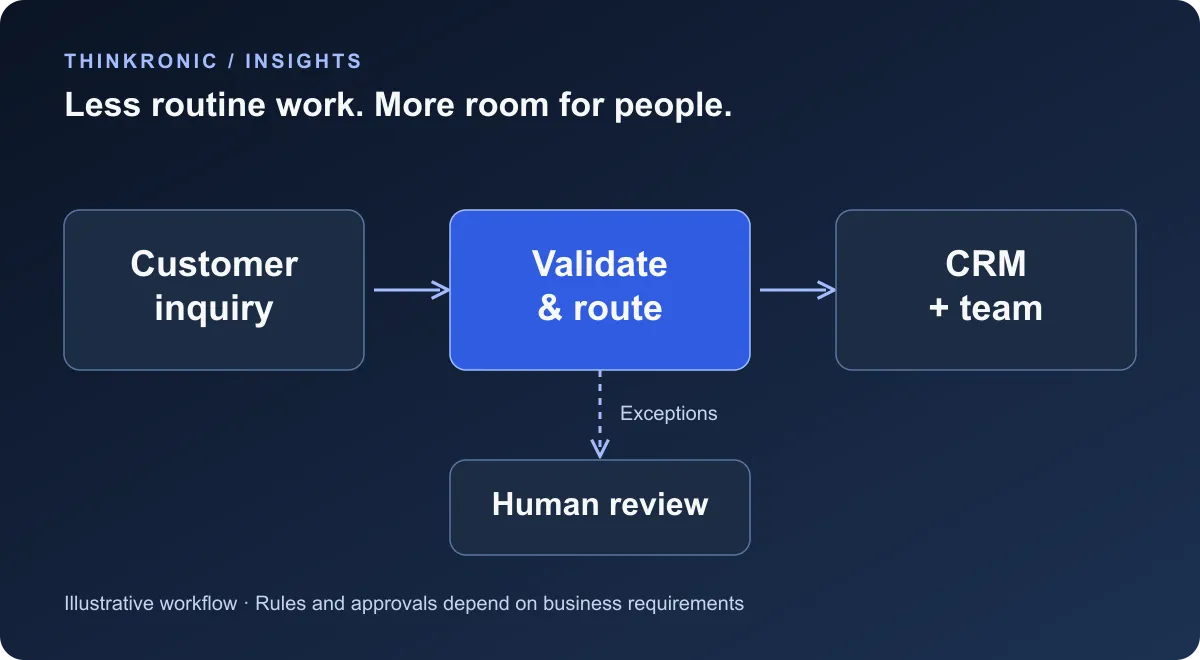
An automated workflow can:
- Receive a customer inquiry.
- Extract relevant information, such as the customer’s name and request.
- Classify the inquiry by topic or department.
- Create a record in the CRM or ticketing system.
- Assign the request to the appropriate team.
- Send an acknowledgment to the customer.
For straightforward requests, predefined rules may be sufficient.
For more complex or unstructured messages, AI can help identify the customer’s intent or summarize the inquiry.
However, AI-generated classifications and responses should be subject to appropriate validation and human review, especially when mistakes could affect customers.
Practical example
A service company receives inquiries about pricing, appointments, technical support, and existing orders.
Instead of manually forwarding every message, an automation system routes each inquiry to the appropriate team.
Requests requiring human judgment remain with employees.
Potential business benefits:
- Faster initial responses.
- Less manual email sorting.
- More consistent inquiry handling.
- Reduced risk of requests being overlooked.
Best suited for: Service companies, customer support teams, and businesses receiving recurring inquiries.
2. Automating lead capture and sales follow-ups
Generating leads is only part of the sales process.
Companies also need to capture inquiries, qualify prospects, assign responsibilities, and follow up at the right time.
When these activities depend on manual data entry, potential opportunities can be delayed or forgotten.
How automation works
A lead automation workflow might:
- Receive a submission from a website form.
- Validate the provided information.
- Create or update a contact in the CRM.
- Check whether the lead already exists.
- Assign the lead based on predefined criteria.
- Notify the responsible salesperson.
- Schedule a follow-up task.
For example, inquiries about enterprise integration could be assigned to a technical sales specialist, while general service requests follow another workflow.
AI can also assist with lead classification, but important sales decisions shouldn’t depend entirely on an opaque scoring system.
Practical example
A B2B consulting company receives project inquiries through its website.
An automated workflow creates the CRM record, identifies the requested service, and notifies the appropriate consultant.
The consultant receives the inquiry with the relevant information already organized.
Potential business benefits:
- Less administrative work for sales teams.
- Faster lead assignment.
- More consistent follow-up.
- Better visibility into incoming opportunities.
Best suited for: B2B service providers, agencies, consulting companies, and sales teams.
3. Automating invoice processing and approvals
Invoice processing often involves several repetitive steps.
An invoice arrives by email, someone downloads it, extracts the details, enters information into accounting software, checks the amounts, and requests approval.
For businesses processing many invoices, these activities can become time-consuming.
How automation works
An invoice automation workflow can:
- Receive an invoice through an approved channel.
- Extract invoice details using document processing software.
- Validate required fields.
- Check for potential duplicates.
- Compare the invoice with an existing purchase order when applicable.
- Route it for approval.
- Transfer approved information to the accounting or ERP system.
AI-based document processing may help extract information from invoices with varying layouts.
However, extracted values should be validated before financial records are created or payments are authorized.
Practical example
A company receives supplier invoices through a dedicated email address.
The automation extracts the invoice number, supplier, amount, and payment details.
Invoices meeting predefined criteria are forwarded to the appropriate approval workflow.
Invoices with missing information or mismatched amounts are flagged for manual review.
Potential business benefits:
- Reduced manual data entry.
- More consistent approval processes.
- Earlier detection of duplicate or incomplete invoices.
- Better visibility into invoice status.
Best suited for: Finance departments, accounting teams, and businesses handling recurring supplier invoices.
4. Automating employee onboarding
Employee onboarding involves coordination between HR, IT, managers, and sometimes external service providers.
A new employee may need access to email, internal applications, equipment, training materials, and company documentation.
When these activities are managed through separate emails and spreadsheets, important steps can be missed.
How automation works
An onboarding workflow can begin when HR confirms a new employee’s start date.
The workflow might:
- Create an onboarding checklist.
- Notify IT about required equipment and access.
- Request account provisioning through approved identity-management systems.
- Schedule onboarding activities.
- Send relevant documents.
- Track completion of required tasks.
Not every step should happen automatically.
Access to sensitive applications may require approval, and account provisioning must follow the company’s security policies.
Practical example
A company hires a new software engineer.
Once HR completes the hiring process, an automated workflow creates tasks for IT, the engineering manager, and HR.
Each department can track its responsibilities, and the onboarding coordinator can see which tasks remain incomplete.
Potential business benefits:
- More consistent onboarding.
- Fewer forgotten tasks.
- Less coordination through email.
- Better visibility across departments.
Best suited for: Growing companies, HR departments, and organizations with recurring onboarding processes.
5. Automating order processing and inventory updates
E-commerce and product-based businesses often rely on several applications.
An online store receives orders, an ERP manages business transactions, and a warehouse system tracks inventory.
When these applications aren’t connected, employees may need to transfer information manually.
How automation works
An order automation workflow can:
- Receive an order from the online store.
- Validate the order information.
- Transfer the order to the ERP or order management system.
- Initiate inventory reservation or availability checks.
- Trigger the fulfillment process.
- Synchronize order status updates.
- Notify customers about relevant changes.
For business-critical workflows, the integration must handle duplicate events, temporary system failures, and inconsistent data.
For example, retrying a failed request should not accidentally create the same order twice.
Practical example
A retailer sells products through Shopify and manages operations through an ERP.
When a customer places an order, the integration transfers the information to the ERP.
As the order progresses, status changes can be synchronized with the online store.
Depending on the inventory requirements, the system may also perform immediate availability checks or reservations to avoid overselling.
Potential business benefits:
- Less manual order processing.
- More consistent order information.
- Faster fulfillment coordination.
- Reduced risk of duplicate or missing transactions.
Best suited for: Retailers, wholesalers, e-commerce companies, and distributors.
6. Automating reports and business notifications
Managers often spend time collecting information from multiple applications.
Sales data might come from a CRM, financial information from an ERP, and operational metrics from another system.
Preparing a weekly report can involve exporting files, combining spreadsheets, and manually calculating figures.
How automation works
A reporting workflow can:
- Retrieve data from relevant systems.
- Validate and transform the information.
- Apply consistent business definitions.
- Update a reporting dataset or dashboard.
- Generate a summary.
- Notify stakeholders when the report is ready.
Automation can also monitor business conditions and send alerts.
For example, a company might receive a notification when an important process fails or a defined operational threshold is exceeded.
Practical example
A consulting company wants a weekly overview of sales opportunities, project utilization, and outstanding invoices.
Instead of assembling the report manually, an automated workflow retrieves information from the relevant applications and updates a dashboard.
Managers can review the information without waiting for someone to prepare multiple spreadsheets.
Potential business benefits:
- Less repetitive reporting work.
- More consistent reporting processes.
- Faster access to operational information.
- Better visibility into important business metrics.
Best suited for: Management teams, finance departments, operations teams, and growing businesses.
7. Automating customer support with AI assistance
Customer support teams frequently handle recurring questions.
Customers ask about order status, appointment availability, account information, and common technical problems.
Some requests can be handled through predefined workflows, while others require human assistance.
AI can help bridge the gap between structured automation and natural-language communication.
How automation works
An AI-assisted support workflow might:
- Receive a customer message.
- Identify the customer’s intent.
- Retrieve relevant information from approved knowledge sources.
- Request data from connected business systems when authorized.
- Suggest or generate a response.
- Escalate uncertain or sensitive requests to a human agent.
- Record the outcome in the support system.
For example, an assistant could retrieve an order’s current status from an ERP or order management system.
However, access must be restricted to information the customer is authorized to receive.
AI responses should also be designed to handle uncertainty rather than invent missing information.
Practical example
An online retailer receives frequent questions about delivery status.
An AI-assisted support system identifies these requests and, after appropriate customer verification, retrieves current shipment information.
Routine questions can be answered automatically, while delivery disputes and unusual cases are escalated to support employees.
Potential business benefits:
- Faster responses to routine questions.
- Reduced workload for support teams.
- More consistent access to information.
- Greater employee focus on complex customer issues.
Best suited for: Customer service departments, online businesses, and companies with recurring support requests.
How much time and money can business automation save?
Automation can reduce operational costs, but the actual savings depend on the process.
A workflow that saves a few minutes per transaction may deliver meaningful value when performed hundreds of times each month.
Consider a hypothetical example.
A company processes 500 customer inquiries per month.
Each inquiry requires approximately four minutes of manual administrative work that could potentially be automated.
That represents:
500 inquiries × 4 minutes = 2,000 minutes, or approximately 33.3 hours per month.
If automation eliminates 75% of that administrative effort, the company could recover approximately 25 working hours each month.
At an illustrative internal labor cost of €30 per hour, that represents around €750 per month in labor capacity.
Scroll sideways if any columns are cut off.
| Metric | Illustrative value |
|---|---|
| Monthly inquiries | 500 |
| Manual administration per inquiry | 4 minutes |
| Total monthly administrative effort | 33.3 hours |
| Assumed reduction | 75% |
| Time recovered | 25 hours/month |
| Labor cost assumption | €30/hour |
| Monthly capacity value | €750 |
| Annual capacity value | €9,000 |
The business value may come from reduced overtime, increased capacity, faster responses, or improved service quality rather than direct reductions in payroll costs.
How to identify processes worth automating
Not every business process should be automated.
Some activities require creativity, negotiation, personal judgment, or complex decision-making.
Others change so frequently that automation would become difficult to maintain.
The best starting points are usually processes with several of the following characteristics:
- High frequency: The same activity happens regularly.
- Clear rules: The process follows predictable steps.
- Significant manual effort: Employees spend considerable time on repetitive tasks.
- Digital information: Required data is available electronically.
- Measurable outcomes: Time, cost, accuracy, or processing speed can be evaluated.
- Manageable exceptions: Unusual cases can be identified and handled appropriately.
A useful approach is to identify three repetitive processes, estimate their current costs, and evaluate the feasibility of automating each one.
Start with a process that offers meaningful value without introducing excessive technical complexity.
Choosing the right automation technology
Businesses have several technology options.
The right choice depends on existing applications, process complexity, integration requirements, and operational expectations.
Workflow automation platforms
Tools such as n8n, Make, and Zapier can connect applications and automate recurring workflows.
They can be effective for scenarios such as form processing, notifications, CRM updates, and simple approval processes.
Their suitability depends on available connectors, hosting options, security requirements, and expected workload.
API-based automation
When applications provide APIs, developers can build direct integrations or dedicated automation services.
This approach offers greater control over business logic, validation, security, and error handling.
It is often useful when workflows involve custom applications or requirements that generic automation tools cannot easily support.
Enterprise integration platforms
Platforms such as MuleSoft support more complex integration environments involving multiple enterprise systems.
They can provide centralized capabilities for API management, transformation, connectivity, and operational governance.
These platforms may be appropriate for larger integration landscapes, but they aren’t automatically necessary for every automation project.
AI-powered automation
AI can help automate activities involving unstructured information, such as emails, documents, and natural-language requests.
However, AI should be introduced where it adds measurable value.
A simple rule-based workflow is often more predictable and economical when the process doesn’t require language understanding or probabilistic classification.
Good automation architecture uses the simplest technology that reliably meets the business requirements.
Common mistakes to avoid
Automation projects can fail when businesses focus on tools before understanding their processes.
Automating an inefficient process
If a process contains unnecessary steps, automating it may simply make those inefficiencies happen faster.
Review and simplify the workflow before implementing automation.
Ignoring exceptions
Real business processes rarely follow the ideal path every time.
Missing information, unavailable systems, and unexpected responses must be handled appropriately.
An automation that works only under perfect conditions may create more problems than it solves.
Connecting systems without clear data ownership
When multiple applications update the same information, inconsistent records can appear.
Define which system owns each type of data and how synchronization conflicts should be handled.
For a deeper explanation, see our article on System integration explained: why connected business systems matter.
Underestimating security and privacy
Automation frequently processes customer, employee, or financial information.
Appropriate access controls, data protection measures, auditability, and regulatory requirements should be considered from the beginning.
Forgetting monitoring and maintenance
Business processes and connected applications change.
Automations need monitoring, error handling, documentation, and ongoing maintenance to remain reliable.
How to start your first automation project
A successful automation initiative doesn’t need to begin with a large transformation program.
Start with one process that creates a clear operational problem.
Step 1: Document the current workflow.
Identify every manual step, the applications involved, and the people responsible.
Step 2: Measure the current effort.
Estimate how frequently the process occurs, how long it takes, and which errors or delays are common.
Step 3: Define the desired outcome.
For example: reduce manual lead entry, shorten inquiry response times, or improve invoice processing accuracy.
Step 4: Evaluate the technical options.
Determine whether existing software capabilities, a workflow automation platform, custom APIs, or AI assistance are appropriate.
Step 5: Build a focused pilot.
Automate a limited part of the process and test it using realistic scenarios, including failures and exceptions.
Step 6: Measure the results.
Compare the automated workflow against the original process.
Track time saved, error rates, processing speed, and ongoing operational costs.
Step 7: Expand gradually.
Once the initial automation is reliable, consider applying the same approach to other processes.
This incremental strategy reduces risk and helps businesses build practical automation capabilities over time.
Frequently asked questions
What is an example of business process automation?
Automatically capturing a website inquiry, creating a CRM record, assigning it to a salesperson, and sending a confirmation email is a common example.
Other examples include invoice approvals, employee onboarding, order synchronization, and automated reporting.
Is business process automation expensive?
Not necessarily.
Simple workflows using existing applications may be relatively inexpensive to implement.
More complex projects involving legacy systems, custom APIs, security requirements, or enterprise integration platforms require additional investment.
The total cost should include implementation, software, maintenance, and monitoring.
Do small businesses benefit from automation?
Yes.
Small businesses often have limited administrative capacity, making repetitive tasks particularly costly.
Automating customer inquiries, appointment coordination, invoice processing, or sales follow-ups can help employees focus on higher-value activities.
Does business process automation require artificial intelligence?
No.
Many business processes can be automated using predefined rules, APIs, and workflow automation tools.
AI is useful when workflows involve unstructured information, language understanding, or tasks that cannot be handled reliably through simple rules.
Can automation connect existing business applications?
Yes.
Automation frequently relies on system integration to exchange information between applications such as CRM, ERP, accounting, and e-commerce platforms.
The available integration options depend on the interfaces and capabilities of each application.
Conclusion: start small, automate what matters
Business process automation isn’t about replacing people with technology.
It’s about reducing unnecessary repetitive work and allowing employees to focus on activities that create greater value.
From handling customer inquiries and managing leads to processing invoices and synchronizing orders, many everyday business processes offer opportunities for improvement.
The most successful automation projects begin with a clear business problem, use appropriate technology, and measure results.
Businesses don’t need to automate everything at once.
Start with one repetitive process, make it reliable, measure the impact, and expand from there.
Have a repetitive process that’s consuming too much time?
Let’s explore how automation could simplify your operations.